The WoW bot that farms in the background and only reads pixels
Mob grinding on your routes, herb and ore gathering with zone sweeps and a combat assistant for any of the 40 specs. Peonix never touches game memory: it watches the screen and presses keys — like you do, minus the fatigue.
Windows 10 and 11 · version 0.9.14 · 48.2 MB
The installer isn’t code-signed yet, so Windows may ask whether you trust it. What to click
During the free period Peonix costs nothing if you let the app send its usage statistics and the bot’s action log. It’s one “Take part” button in the app, and you can opt out at any time. What exactly is sent
- WoW Retail · Midnight 12.1
- Windows 10 / 11
- 3 ready modes
- 40 rotations
- No injection, no memory reading
- Runs in the background, never steals focus
- Screen pixels only
- No injection, unlockers or memory reading
- A unique build for every install
- Behaves like a human
- Updated for patch 12.1
Features
Three modes, ready to work
Each comes with its own pre-start checks and a decision log. In all three, combat follows your specialization’s book.
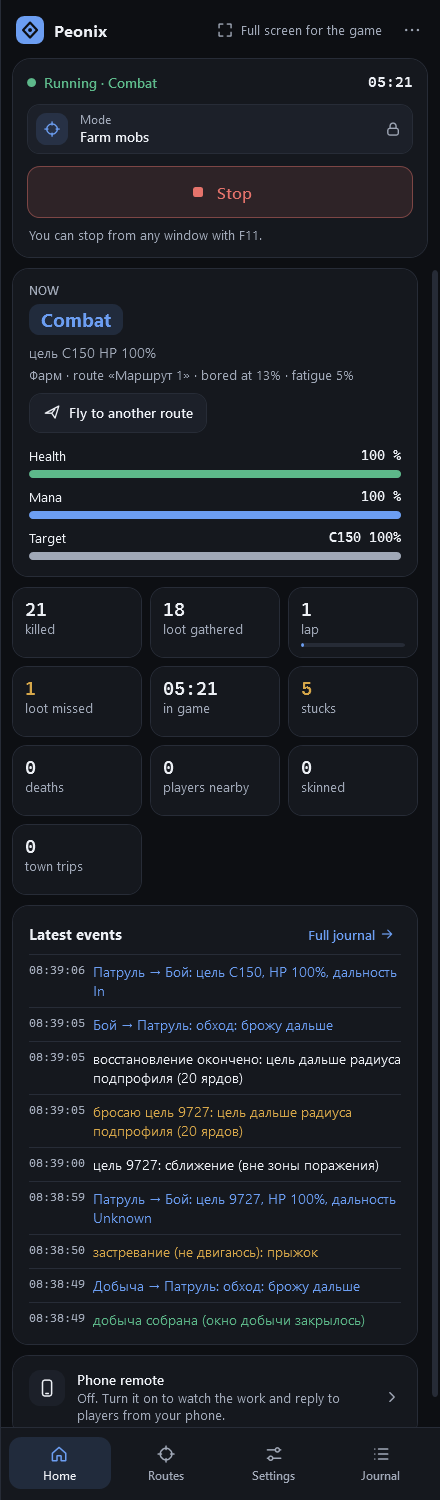
Mob grinding
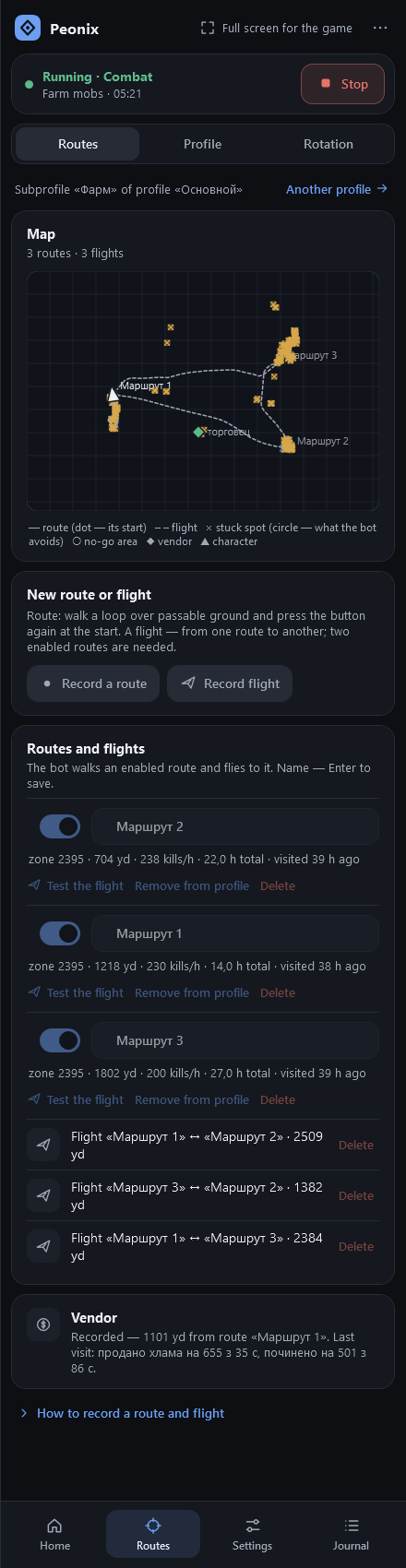
Record a lap and the bot walks it, picks targets, fights with your rotation, loots and skins. It flies to town when bags fill up and moves to another route when a spot gets old or crowded.
- Routes, sub-profiles and flights
- Sells junk, repairs, mails to an alt
- Moves on when bored or crowded
Gathering
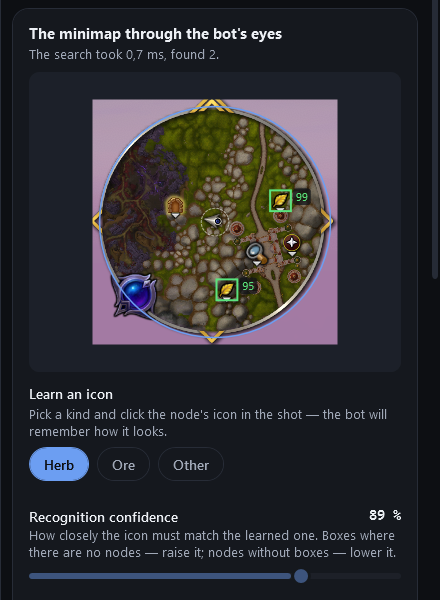
The bot sees nodes the way you do — by their minimap icons. It sweeps the zone in strips with no route at all, lands beside a node, gathers it, gets back on course and remembers node spots on a map.
- Whole-zone sweep, no routes needed
- Nodes by minimap icons
- Node map: 1.3–3× more nodes
Combat assistant
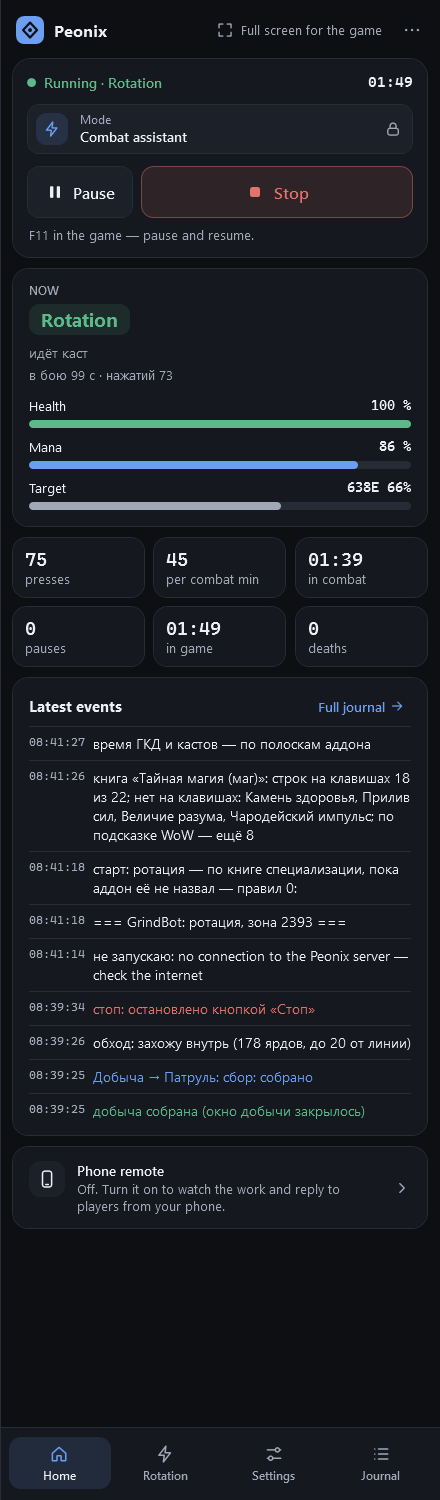
You move and pick targets; the bot presses combat keys from your spec’s book at the end of every global cooldown. Interrupts, defensives and big cooldowns land on time, and healers heal the group.
- All 40 specs, 13 classes
- Presses at GCD end, zero downtime
- F11 pauses instantly
Coming soonThe app already lists more modes, marked “in development”. We’ll open them once they’re proven in the game:
- fishing
- dungeons with players
- follower dungeons
- group: follow the leader
- quests
In action
Watch the bot play
Screen recordings: mob grinding, herb gathering on a zone sweep and a healer in a Mythic+ dungeon. The game on the left, the app on the right — what the bot is doing and why.
Mob grinding
Gathering
Combat assistant
Combat assistant: a healer in a raid
A clip from a real screen recording — the bot’s actions are not staged.
How it works
It watches the screen, presses keys — and nothing else
Peonix works from outside the game: it injects nothing and never reads game memory. Here’s how it works — and what we don’t promise.
- 1.Addondraws the game state as a block of colored squares in a screen corner
- 2.Screenthe app reads that block — and the minimap when gathering
- 3.Decisionfight, move, loot, rest or raise an alarm
- 4.Keythe press goes to the game window in the background, no mouse, no focus
Background & AFK
Keys go to the game window as Windows messages. The bot never takes focus or moves your mouse — work in other windows or step away.
A unique build
The addon name, marker colors, square size and action rhythm are generated at install. No two Peonix installs look alike.
Human-like
Natural reaction-time spread, a different path every lap, breaks every 12–25 minutes and 20–40-minute “fatigue” rests.
Watches your back
A whisper, invite, duel, someone following you or an odd death — the bot stops, takes screenshots, saves a report and logs out.
Safety
Why Peonix is safe
The app is built to stay out of both the game and your computer. Each point below is how it actually works, not a promise.
- Nothing injected into the gamePeonix doesn’t read or write WoW’s memory, doesn’t attach to the game process, and installs no hooks or drivers. Not a single line of its code runs inside the game.
- Official API onlyThe game state comes from an ordinary addon on Blizzard’s public API — like thousands of others. No unlockers, no protected-function workarounds.
- Keys as plain messagesKey presses go to the game window as Windows messages. The app never touches your mouse or focus — you can keep working in other windows.
- No admin rightsIt installs and runs under your own Windows account. No services, no drivers.
- Signed updatesA new version is installed only if the release signature and its SHA-256 checksum match. The app won’t install a tampered file.
- No Battle.net passwordYou sign in to Peonix with a code from your email. The app never asks for your game account details, and it sends work reports only with your consent.
Honest about the risk
For your computer and data, Peonix is safe. Your game account is another matter: bots violate Blizzard’s Terms of Use, and Blizzard analyzes behavior too — playtime, routes, activity. A pixel bot carries less risk than injection bots, but there is always a ban risk, and “undetectable bot” claims are false, whoever makes them. Only run the bot on an account you’re willing to risk.
Safety questionsHow to start
From download to Start in about fifteen minutes
- 1
Download and install
The installer for Windows 10 and 11 needs no admin rights, and there’s no separate .NET to install.
- 2
Sign in with email
No password: a 6-digit code arrives by email. On the “Free period” card, click “Take part”.
- 3
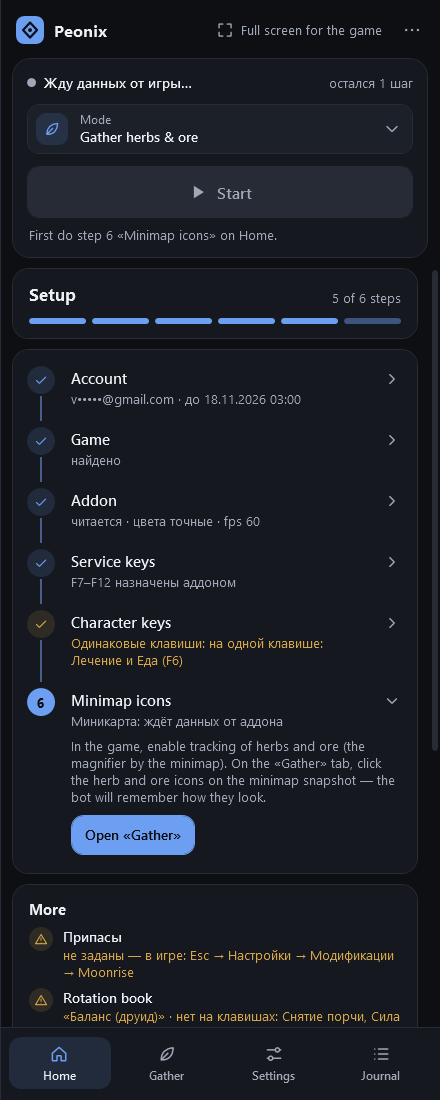
Go through Setup
Steps on the app’s Home page: the game, the addon in one click, keys, your first route or herb icons.
- 4
Press Start
The bot runs in the background. Stop it with the same button or F11 from any window.
Free period
Free until November 17 — in exchange for usage stats
While the bot is being proven in the real game, it’s free for everyone who helps improve it: after every run the app sends a short report and the bot’s action log. That’s how we find and fix bugs.
What the app sends
- The mode, run time and app version
- Counters: mobs killed, loot and nodes gathered and so on
- Why the bot stopped
- The bot’s action log — it may include names of nearby characters
What it never sends
- Passwords
- Your email address
- Files from your computer
Logs are kept for 90 days, run records for a year. Only the owner of Peonix receives them.
After November 17 — a subscription from €10.50 a month.Pricing
Frequently asked questions
Can I get banned for using the bot?
Yes. Bots violate Blizzard’s Terms of Use, and nobody can guarantee otherwise. Peonix injects nothing into the game and behaves like a person, but Blizzard analyzes behavior too. Only bot on an account you’re willing to risk.
Does the app read game memory?
No. The game state comes from a companion addon as colored squares in a screen corner. The app only reads screen pixels and sends key presses to the game window.
Is the app safe for my computer?
Yes. Peonix installs and runs without admin rights, installs no services or drivers and never attaches to the game process. Updates are installed only if the release’s digital signature and the file’s SHA-256 checksum match.
Which WoW versions are supported?
Only World of Warcraft Retail — currently Midnight 12.1. Classic, Hardcore and private servers aren’t supported: the bot relies on features of the modern client.
Can I minimize the game while the bot runs?
No. The bot reads the screen, so the WoW window must stay visible: not minimized, top-left corner uncovered. You can still work in other windows.
Can I use it for free?
Yes, until November 17 inclusive — if you let the app send its usage statistics and the bot’s action log. It’s the “Take part” button on the Account page in the app or in your account on the website. You can opt out at any time.
How long does setup take?
About 15 minutes: Setup on the app’s Home page walks you through the game, the addon, keys and your first route or herb icons — and shows anything still missing.
Let your character do the work
Download Peonix and try all three modes on your own character — free until November 17.
Windows 10 and 11 · version 0.9.14 · 48.2 MB