WoW gathering bot: herbs and ore with zone sweep or routes
The bot sees nodes the way you do — by their minimap icons. It sweeps the zone in strips or flies your route, lands beside a node, gathers it and gets back on course. The longer it runs, the better it knows where herbs grow.
- Herbs, ore, lumber
- Zone sweep or custom area
- Remembers node spots
Windows 10 and 11 · version 0.9.14 · 48.2 MB
Free until November 17
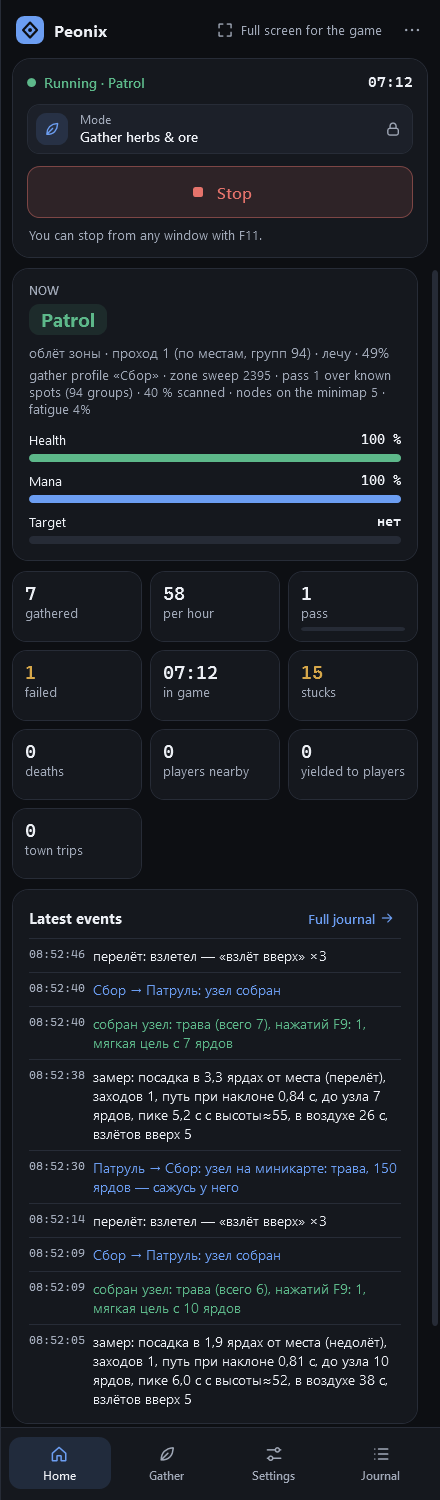
What it looks like in the game
What the bot does
Nodes by minimap icon
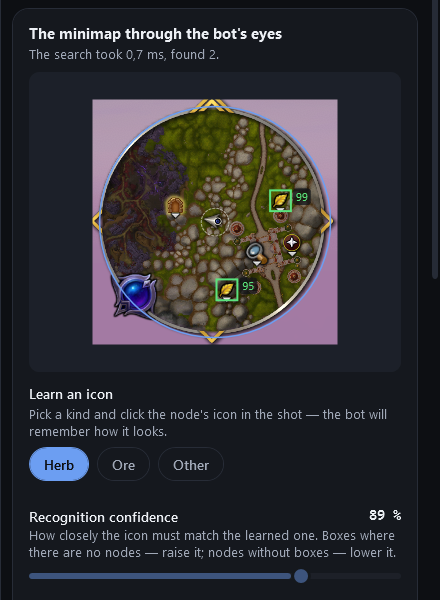
Click an icon on the minimap snapshot and the bot cuts it out without the background and remembers it. Real nodes match at 90–99% confidence.
Whole-zone sweep
No route needed: it flies strips over the zone your character is in. The border comes from the game’s own map, so it never wanders over the sea or into other zones.
Custom area
Only want part of a zone? Fly its edge once and the bot gathers strictly inside — ideal for patches rich in the herb you need.
Node map
Every node it sees is marked on a zone map. With enough spots known, it flies loops through the clusters. In the simulator that gathered 1.3–3× more nodes in the same time.
Lands like a player
It lands 8–12 yards short of the node on the approach side and rides in: herbs often grow under trees, and the canopy would hold the mount.
No-go and danger spots
Dungeon entrances and places it got stuck are marked and avoided automatically. Add your own no-go zone — a cave, water, a dangerous spot — in one click.
How to start
- 1
Pick the mode
On the app’s Home page, choose “Gather herbs & ore”. By default the bot sweeps the whole zone — no routes needed.
- 2
Prepare the minimap
Turn on herb and ore tracking and zoom the minimap out — the farther it sees, the sooner the bot spots a node.
- 3
Teach the icons
Gathering tab: pick a node type and click its icon on “The minimap through the bot’s eyes”.
- 4
Take off
Bind your flying mount in Settings and press Start. The bot handles the rest.
How the zone sweep works
Strips are spaced so the minimap covers the whole zone: first along the long side, then across it. Strips curve slightly, spacing changes from pass to pass, and turns are smooth arcs. After a node, a fight or a rest, the bot rejoins the same strip further ahead.
You pick the sweep altitude: low (~25 yards), medium (~40) or high (~60). Hit a mountain and the bot backs off, climbs and clears it — then remembers the spot and climbs early next time.
Skyriding and Steady Flight
The bot flies the way your mount flies. With Skyriding it tracks Skyward Ascent and Surge Forward charges, uses Second Wind when it runs dry and lands with a steep dive. With Steady Flight it holds jump to climb and descend over the landing spot.
What happens to the loot
Vendors don’t buy herbs and ore as junk, so with full bags mail is the answer: add the item IDs to the addon’s mail list and the bot sends everything to your alt. In gathering mode it only visits the vendor to repair.
Keep the minimap visible at all times. If another window covers it for two minutes, the bot lands and stops.
Safety in this mode
Nodes with other players standing next to them are left alone for a couple of minutes.
Breaks every 12–25 minutes: a landing in the open and 20–60 seconds of “looking around”.
A group invite during a sweep means landing and logging out.
FAQ
Does it gather only herbs, or ore as well?
Herbs, ore and other nodes such as lumber. The gathering profile lists which types to collect, and the bot learns each icon from your click.
Do I need to record a route for gathering?
No. By default a gathering profile uses the zone sweep: the bot builds strips inside the border it reads from the game map. Routes are optional.
What if the bot mistakes icons?
Frames on the minimap snapshot show what it sees. False frames — raise the recognition confidence; nodes without frames — lower it or teach the icon again. 85–90% works best.
Can it gather on foot?
Yes. On routes the bot can walk, ride on the ground or fly — you choose in the gathering settings.
Other modes
Mob grinding
Grinds your routes: combat, loot, skinning, resting and town trips.
- Routes, sub-profiles and flights
- Sells junk, repairs, mails to an alt
- Moves on when bored or crowded
Combat assistant
You steer, the bot presses the rotation. Anywhere, even raids.
- All 40 specs, 13 classes
- Presses at GCD end, zero downtime
- F11 pauses instantly
Three modes, one app
Mob grinding, herb and ore gathering and the combat assistant — one install, one subscription. Free until the free period ends.
Windows 10 and 11 · version 0.9.14 · 48.2 MB